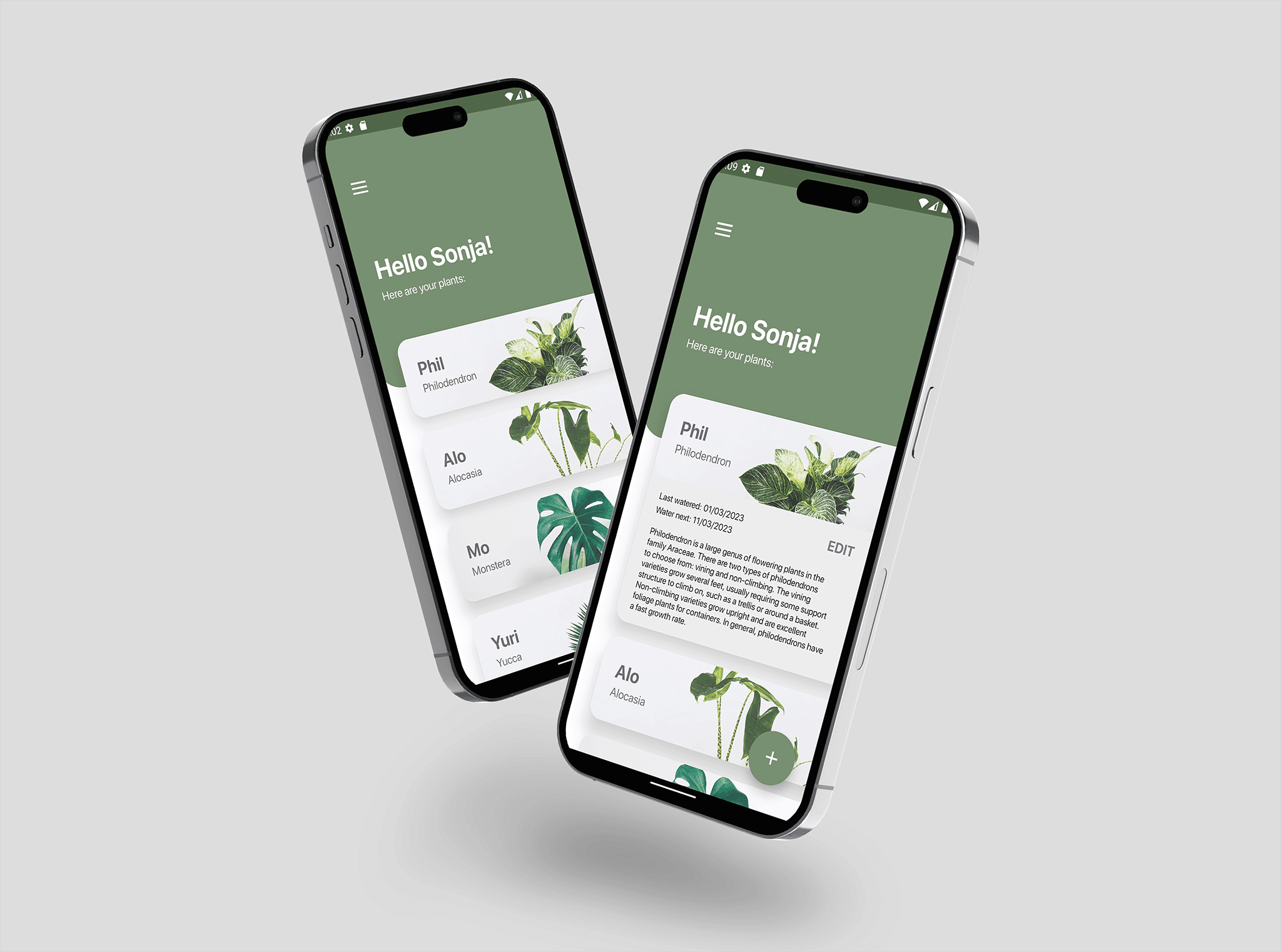
This project required the development and conceptualisation of a CRUD application in Android Studio based on given specifications. The final concept revolved around the implementation of a digital plant encyclopedia/diary. Within the application, users are able to monitor their houseplants and their irrigation status.
TOOLS USED
Figma, Android Studio, GitHub, Kotlin, SQLite
ROLE
UX/UI Designer, Developer
This project required the development and conceptualisation of a CRUD application in Android Studio based on given specifications. The final concept revolved around the implementation of a digital plant encyclopedia/diary. Within the application, users are able to monitor their houseplants and their irrigation status.
TOOLS USED
Figma, Android Studio, GitHub, Kotlin, SQLite
ROLE
UX/UI Designer, Developer
Plantify
Ideation
The first primary objective was to identify a relevant challenge that could be effectively addressed through application development. In a brainstorming session, the idea emerged to create an app focused on managing houseplants. A key feature of the envisioned concept was intelligent reminders tailored to the unique watering needs of each plant species. This approach reflects a dedication to enhancing user experience through a purposeful and user-friendly application.
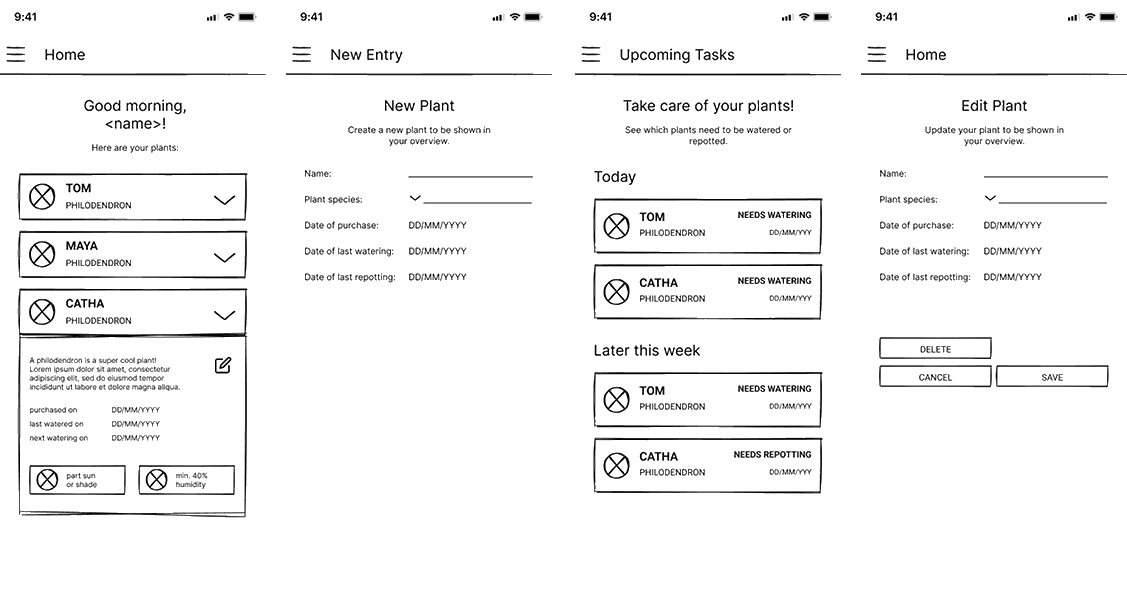
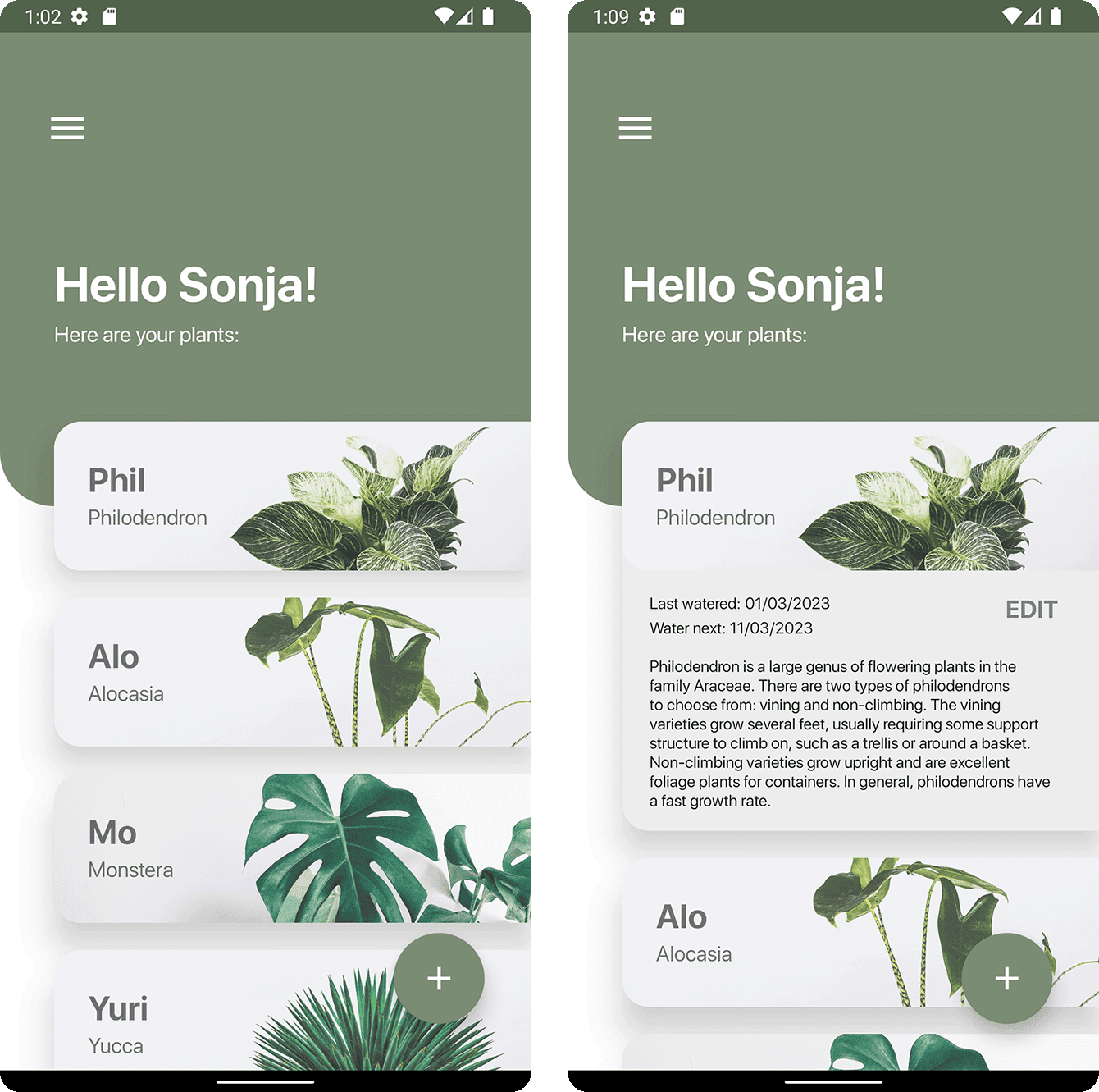
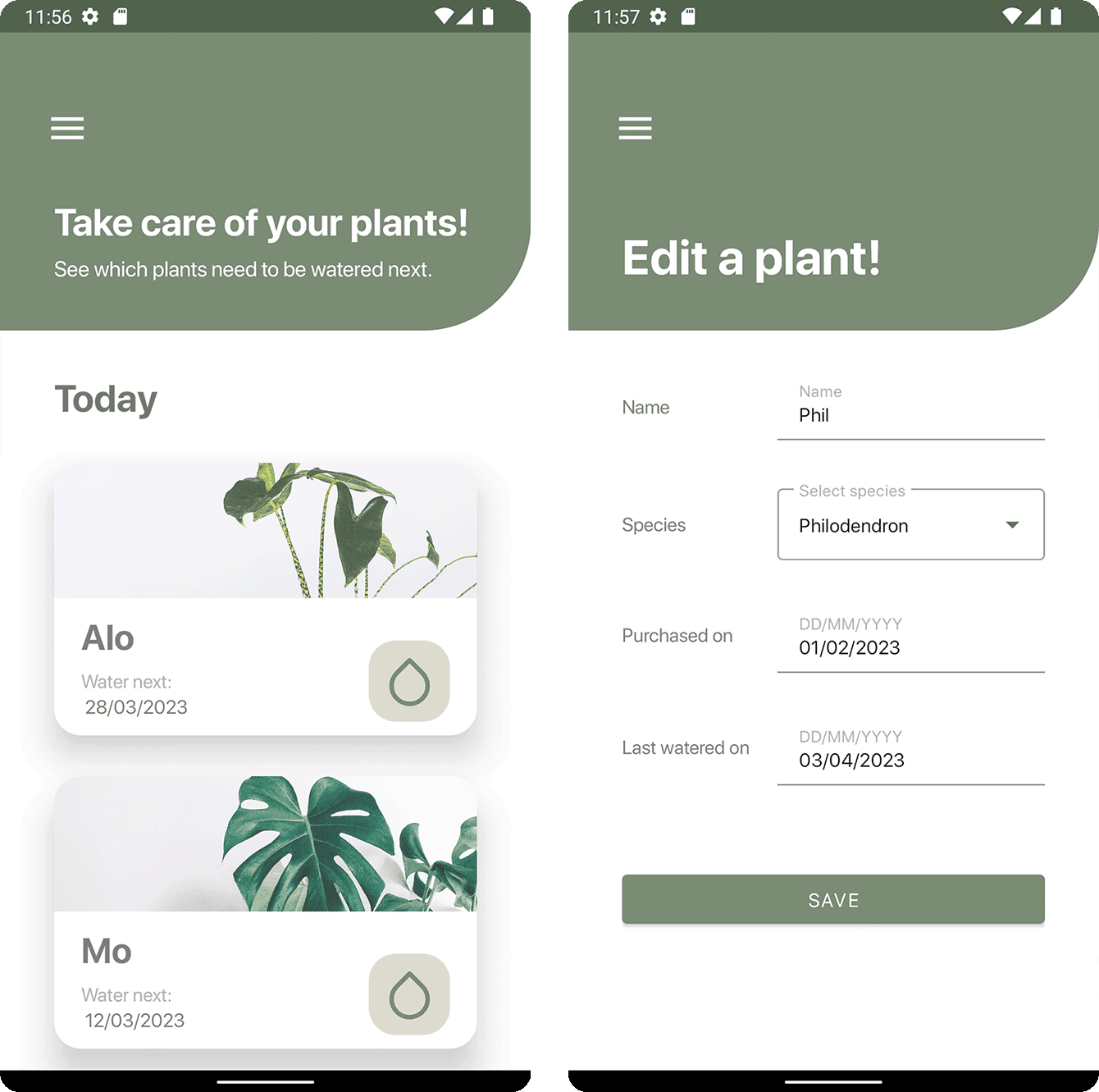
After the ideation, a first draft of screen designs was created. They incorporated the following views:
HOME - Dashboard
NEW ENTRY - Create New Plant
UPCOMING TASKS - Reminder List
EDIT ENTRY - Edit Plant Data
Ideation
The first primary objective was to identify a relevant challenge that could be effectively addressed through application development. In a brainstorming session, the idea emerged to create an app focused on managing houseplants. A key feature of the envisioned concept was intelligent reminders tailored to the unique watering needs of each plant species. This approach reflects a dedication to enhancing user experience through a purposeful and user-friendly application.
After the ideation, a first draft of screen designs was created. They incorporated the following views:
HOME - Dashboard
NEW ENTRY - Create New Plant
UPCOMING TASKS - Reminder List
EDIT ENTRY - Edit Plant Data
App Structure
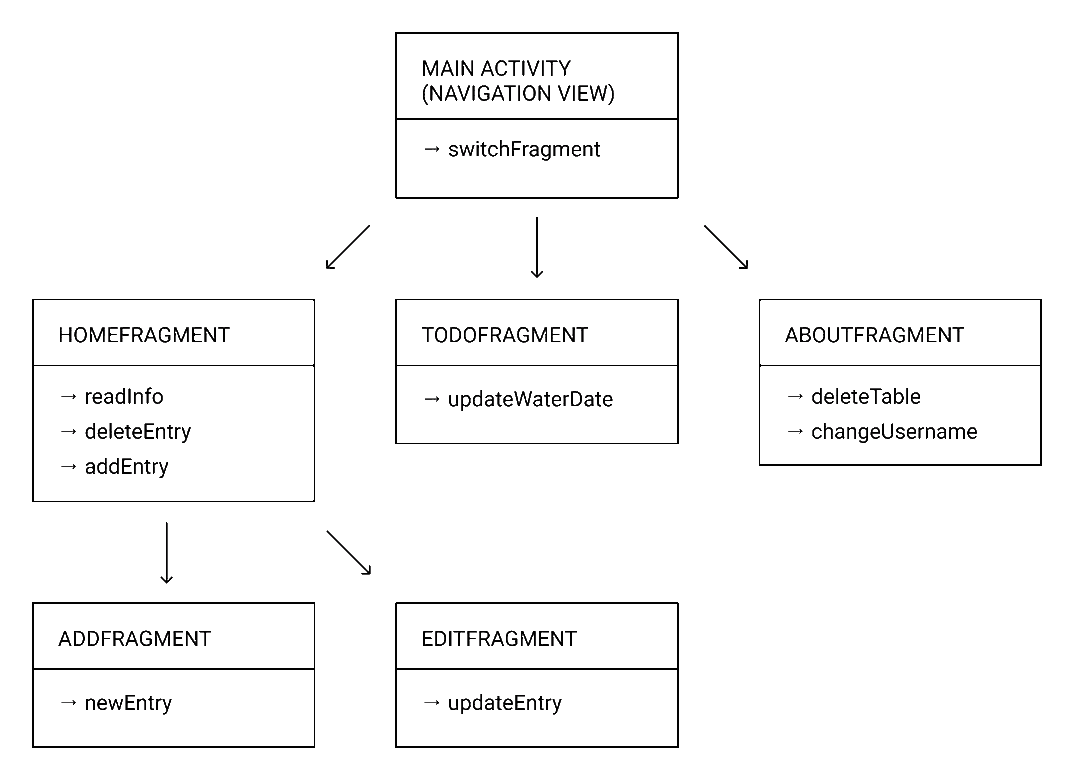
The app structure above was developed. The main view controller consists of the navigation controller, which is part of the navigation drawer. From here, the user can navigate to the 'Home,' 'ToDo,' and 'Settings' pages.
In the 'Home' fragment, new entries can be created or existing entries can be edited.
Data Class
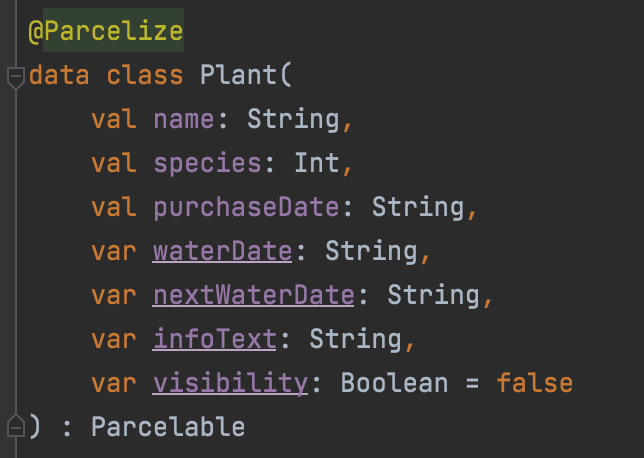
A basic data class of the plant entity to be displayed in the app was created. When creating a plant, the user needs to register a name, species, the date when the plant was purchased, and the date the plant was last watered.
App Structure
The app structure above was developed. The main view controller consists of the navigation controller, which is part of the navigation drawer. From here, the user can navigate to the 'Home,' 'ToDo,' and 'Settings' pages.
In the 'Home' fragment, new entries can be created or existing entries can be edited.
Data Class
A basic data class of the plant entity to be displayed in the app was created. When creating a plant, the user needs to register a name, species, the date when the plant was purchased, and the date the plant was last watered.
Lessons Learned
CHALLENGES & OPPORTUNITIES
This project encountered some challenges in the realm of time management, as it was created within a timeframe of only 10 weeks while also requiring work on learning materials, progress reports, and research on best practices.
OUTLOOK
Additional features for the app could include implementing notifications to remind the user when a plant needs watering. Alternatively, instead of switching from the ToDoFragment to the HomeFragment after watering a plant, the app could stay in the ToDoFragment and push the watered entry down to the 'Later' list.
Lessons Learned
CHALLENGES & OPPORTUNITIES
This project encountered some challenges in the realm of time management, as it was created within a timeframe of only 10 weeks while also requiring work on learning materials, progress reports, and research on best practices.
OUTLOOK
Additional features for the app could include implementing notifications to remind the user when a plant needs watering. Alternatively, instead of switching from the ToDoFragment to the HomeFragment after watering a plant, the app could stay in the ToDoFragment and push the watered entry down to the 'Later' list.

Let's Work Together.